
Problem: How to show bullets in ListView/TextView in Android?
Description:
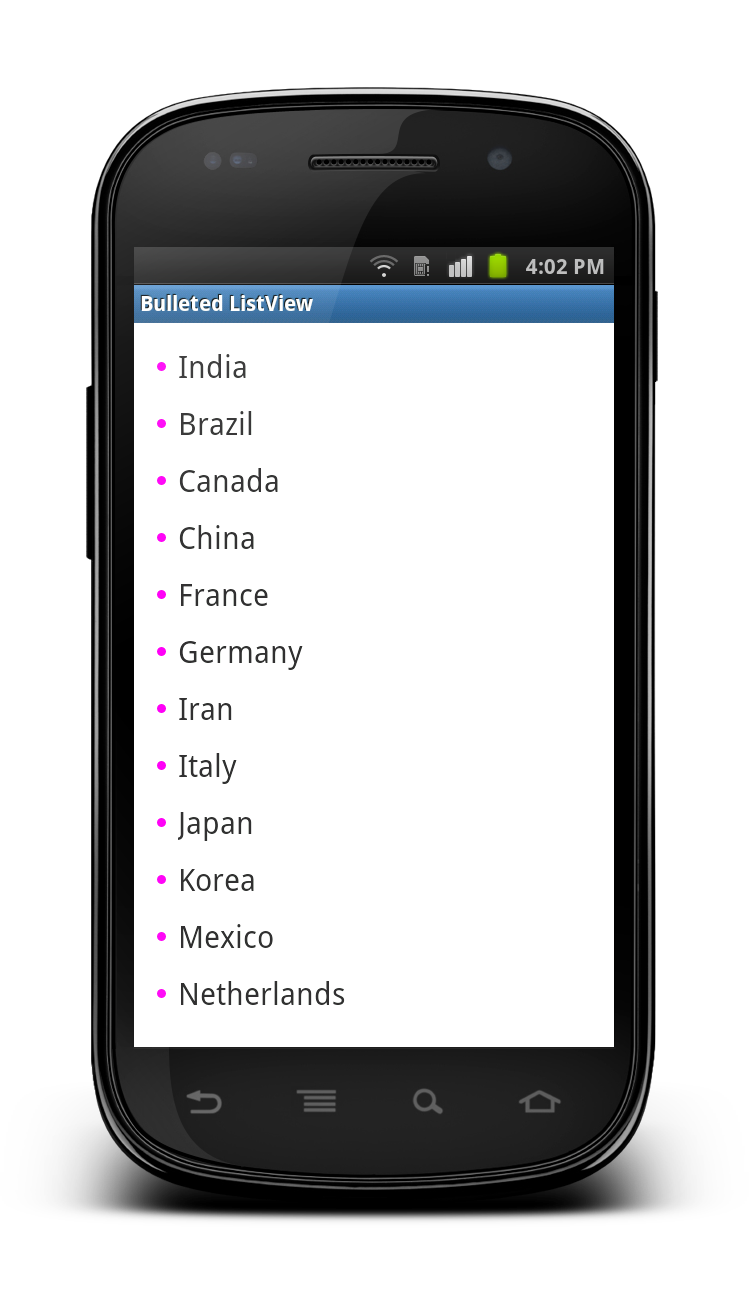
There is no easy way to show indentation in ListView/TextView, so here i made a trick and define a drawable to display Bullet at left side of each item of the ListView. And i have defined a custom listview row file and used the same drawable file using android:drawableLeft=”@drawable/bullet”.
Go through the solution or download the source code and let me know your review/updates.
Related articles for displaying ListView in Android
Output:
Solution:
main.xml
<?xml version="1.0" encoding="utf-8"?>
<LinearLayout
    xmlns:android="http://schemas.android.com/apk/res/android"
    android:layout_width="fill_parent"
    android:layout_height="fill_parent"
    android:orientation="vertical"
    android:padding="10dp">

    <ListView
        android:id="@+id/listView"
        android:layout_width="fill_parent"
        android:layout_height="wrap_content"
        android:listSelector="@android:color/transparent"
        android:divider="@null"/>
</LinearLayout>
bullet.xml [store it inside the drawable folder]
<?xml version="1.0" encoding="utf-8"?>
<shape
    xmlns:android="http://schemas.android.com/apk/res/android"
    android:shape="oval">
    <size
        android:width="6dp"
        android:height="6dp"/>
    <solid
        android:color="#FF00F0"/>
</shape>
list_item.xml
<?xml version="1.0" encoding="utf-8"?>
<TextView
    xmlns:android="http://schemas.android.com/apk/res/android"
    android:layout_width="wrap_content"
    android:layout_height="wrap_content"
    android:id="@+id/itemText"
    android:drawableLeft="@drawable/bullet"
    android:drawablePadding="8dp"
    android:padding="5dp"
    android:textSize="20sp"
    android:text="List Item"/>
BulletedListViewActivity.java
package com.technotalkative.bulletedlistview;

import java.util.ArrayList;
import android.app.Activity;
import android.os.Bundle;
import android.widget.ArrayAdapter;
import android.widget.ListView;

public class BulletedListViewActivity extends Activity {
    /** Called when the activity is first created. */

	ArrayList<String> listCountry;

    @Override
    public void onCreate(Bundle savedInstanceState) {
        super.onCreate(savedInstanceState);
        setContentView(R.layout.main);

            prepareList();

            ListView listView = (ListView)findViewById(R.id.listView);
            listView.setAdapter(new ArrayAdapter<String>(
                                this, R.layout.list_item, listCountry));
    }

    public void prepareList()
    {
          listCountry = new ArrayList<String>();
          listCountry.add("India");
          listCountry.add("Brazil");
          listCountry.add("Canada");
          listCountry.add("China");
          listCountry.add("France");
          listCountry.add("Germany");
          listCountry.add("Iran");
          listCountry.add("Italy");
          listCountry.add("Japan");
          listCountry.add("Korea");
          listCountry.add("Mexico");
          listCountry.add("Netherlands");
          listCountry.add("Portugal");
          listCountry.add("Russia");
          listCountry.add("Saudi Arabia");
          listCountry.add("Spain");
          listCountry.add("Turkey");
          listCountry.add("United Kingdom");
          listCountry.add("United States");
    }
}
Download full Example from Here: Android – Bullets in ListView