Welcome to the part 5 of ListView series, so far this series:
- Part 1 – Simple listview
- Part 2 – ListView with Two TextViews
- Part 3 – ListView with Two TextView and One ImageView
- Part 4 – ListView with Two TextView and One ImageView
In part 4, we talked about display a listview, having two TextView and one ImageView in each items. In part 4, we prepared different arrays and passing the same into the custom adapter, but managing different arrays is not a good and standard practice. Just consider a case where you need to delete an item from ListView, here you will have to take care of deleting that item related details from each arrays.
The standard practice is to have a list of objects. To have a list of objects, we can take ArrayList to add/delete items into it.
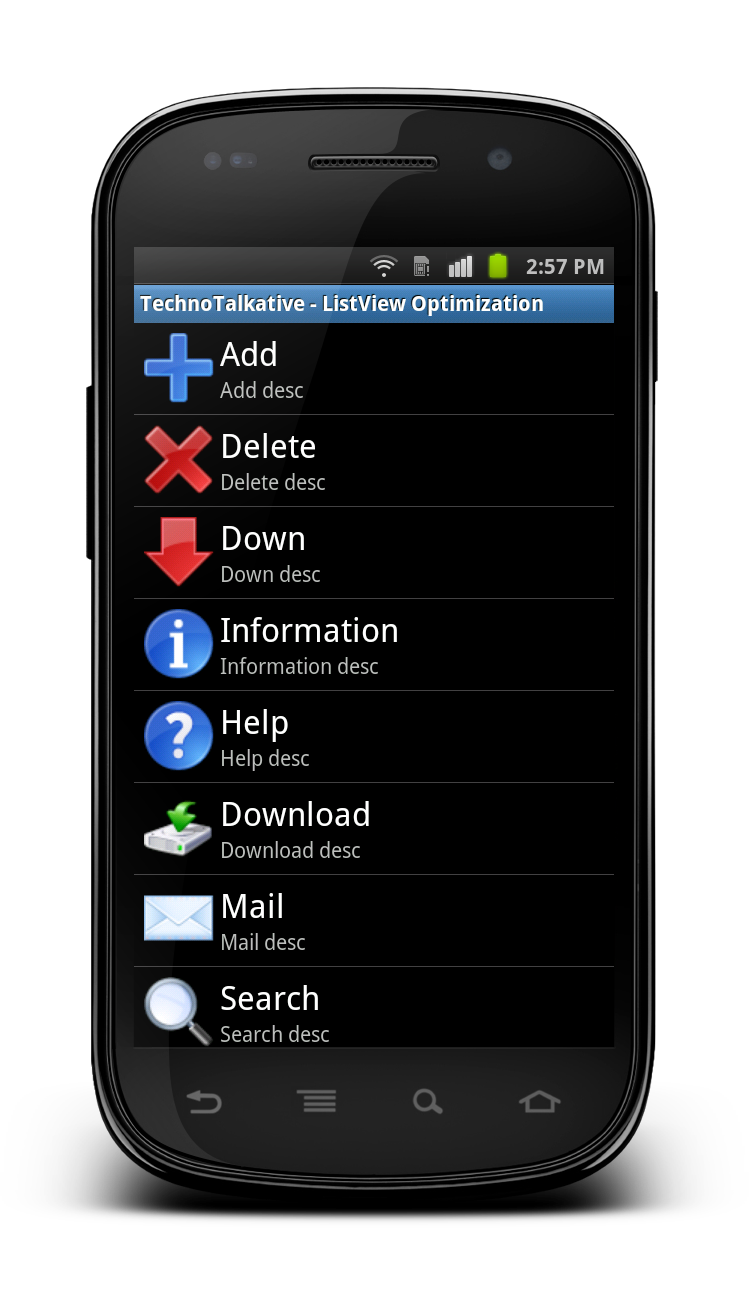
Solution:
main.xml
<?xml version="1.0" encoding="utf-8"?>
<LinearLayout xmlns:android="http://schemas.android.com/apk/res/android"
    android:layout_width="fill_parent"
    android:layout_height="fill_parent"
    android:orientation="vertical" >

    <ListView
        android:id="@+id/listView1"
        android:layout_width="fill_parent"
        android:layout_height="fill_parent" >
    </ListView>

</LinearLayout>
items.xml
<?xml version="1.0" encoding="utf-8"?>
<RelativeLayout
	android:id="@+id/relativeLayout1"
	android:layout_width="fill_parent"
	android:layout_height="fill_parent"
	xmlns:android="http://schemas.android.com/apk/res/android"
	android:padding="5dip">

    <ImageView
    	android:layout_width="50dip"
    	android:layout_height="50dip"
    	android:id="@+id/imgViewLogo"
    	android:src="@drawable/icon"
    	android:layout_alignParentLeft="true"
    	android:layout_centerInParent="true"
    	android:scaleType="center">
    </ImageView>

    <TextView
    	android:textAppearance="?android:attr/textAppearanceLarge"
    	android:layout_height="wrap_content"
    	android:text="TextView"
    	android:layout_width="wrap_content"
    	android:id="@+id/txtViewTitle"
    	android:layout_toRightOf="@+id/imgViewLogo"
    	android:layout_marginLeft="2dip">
    </TextView>

    <TextView
    	android:layout_height="wrap_content"
    	android:text="TextView"
    	android:layout_width="wrap_content"
    	android:id="@+id/txtViewDescription"
    	android:layout_toRightOf="@+id/imgViewLogo"
    	android:layout_below="@+id/txtViewTitle"
    	android:layout_marginLeft="2dip">
    </TextView>

</RelativeLayout>
ItemBean.java
package com.technotalkative.listview5;

public class ItemBean
{
	String title;
	String description;
	int image;

	public String getTitle() {
		return title;
	}

	public void setTitle(String title) {
		this.title = title;
	}

	public String getDescription() {
		return description;
	}

	public void setDescription(String description) {
		this.description = description;
	}

	public int getImage() {
		return image;
	}

	public void setImage(int image) {
		this.image = image;
	}
}
ListViewCustomAdapter.java
package com.technotalkative.listview5;

import java.util.ArrayList;

import android.app.Activity;
import android.content.Context;
import android.view.LayoutInflater;
import android.view.View;
import android.view.ViewGroup;
import android.widget.BaseAdapter;
import android.widget.ImageView;
import android.widget.TextView;

public class ListViewCustomAdapter extends BaseAdapter{

	ArrayList<Object> itemList;

    public Activity context;
    public LayoutInflater inflater;

    public ListViewCustomAdapter(Activity context,ArrayList<Object> itemList) {
        super();

        this.context = context;
        this.itemList = itemList;

        this.inflater = (LayoutInflater)context.getSystemService(Context.LAYOUT_INFLATER_SERVICE);
    }

    @Override
    public int getCount() {
        // TODO Auto-generated method stub
        return itemList.size();
    }

    @Override
    public Object getItem(int position) {
        // TODO Auto-generated method stub
        return itemList.get(position);
    }

    @Override
    public long getItemId(int position) {
        // TODO Auto-generated method stub
        return 0;
    }

    public static class ViewHolder
    {
        ImageView imgViewLogo;
        TextView txtViewTitle;
        TextView txtViewDescription;
    }

    @Override
    public View getView(int position, View convertView, ViewGroup parent) {
        // TODO Auto-generated method stub

        ViewHolder holder;
        if(convertView==null)
        {
            holder = new ViewHolder();
            convertView = inflater.inflate(R.layout.items, null);

            holder.imgViewLogo = (ImageView) convertView.findViewById(R.id.imgViewLogo);
            holder.txtViewTitle = (TextView) convertView.findViewById(R.id.txtViewTitle);
            holder.txtViewDescription = (TextView) convertView.findViewById(R.id.txtViewDescription);

            convertView.setTag(holder);
        }
        else
            holder=(ViewHolder)convertView.getTag();

        ItemBean bean = (ItemBean) itemList.get(position);

        holder.imgViewLogo.setImageResource(bean.getImage());
        holder.txtViewTitle.setText(bean.getTitle());
        holder.txtViewDescription.setText(bean.getDescription());

        return convertView;
    }

}
MainActivity.java
package com.technotalkative.listview5;

import java.util.ArrayList;

import android.app.Activity;
import android.os.Bundle;
import android.view.View;
import android.widget.AdapterView;
import android.widget.ListView;
import android.widget.Toast;
import android.widget.AdapterView.OnItemClickListener;

public class MainActivity extends Activity implements OnItemClickListener {

    ListView lview3;
    ListViewCustomAdapter adapter;
    private ArrayList<Object> itemList;
    private ItemBean bean;

    @Override
    public void onCreate(Bundle savedInstanceState) {
        super.onCreate(savedInstanceState);
        setContentView(R.layout.main);

        prepareArrayLits();
        lview3 = (ListView) findViewById(R.id.listView1);
        adapter = new ListViewCustomAdapter(this, itemList);
        lview3.setAdapter(adapter);

        lview3.setOnItemClickListener(this);
    }

    @Override
    public void onItemClick(AdapterView<?> arg0, View arg1, int position, long id) {
        // TODO Auto-generated method stub
    	ItemBean bean = (ItemBean) adapter.getItem(position);
    	Toast.makeText(this, "Title => "+bean.getTitle()+" n Description => "+bean.getDescription(), Toast.LENGTH_SHORT).show();
    }

    /* Method used to prepare the ArrayList,
     * Same way, you can also do looping and adding object into the ArrayList.
     */
    public void prepareArrayLits()
    {
    	itemList = new ArrayList<Object>();

    	AddObjectToList(R.drawable.ic_add, "Add", "Add desc");
    	AddObjectToList(R.drawable.ic_delete, "Delete", "Delete desc");
    	AddObjectToList(R.drawable.ic_down, "Down", "Down desc");
    	AddObjectToList(R.drawable.ic_info, "Information", "Information desc");
    	AddObjectToList(R.drawable.ic_help, "Help", "Help desc");
    	AddObjectToList(R.drawable.ic_download, "Download", "Download desc");
    	AddObjectToList(R.drawable.ic_mail, "Mail", "Mail desc");
    	AddObjectToList(R.drawable.ic_search, "Search", "Search desc");
    	AddObjectToList(R.drawable.ic_settings, "Settings", "Settings desc");
    }

    // Add one item into the Array List
    public void AddObjectToList(int image, String title, String desc)
    {
    	bean = new ItemBean();
    	bean.setDescription(desc);
    	bean.setImage(image);
    	bean.setTitle(title);
    	itemList.add(bean);
    }
}
You can download source code from here: Android Custom ListView.