
Problem: how to use SAX to parse XML?
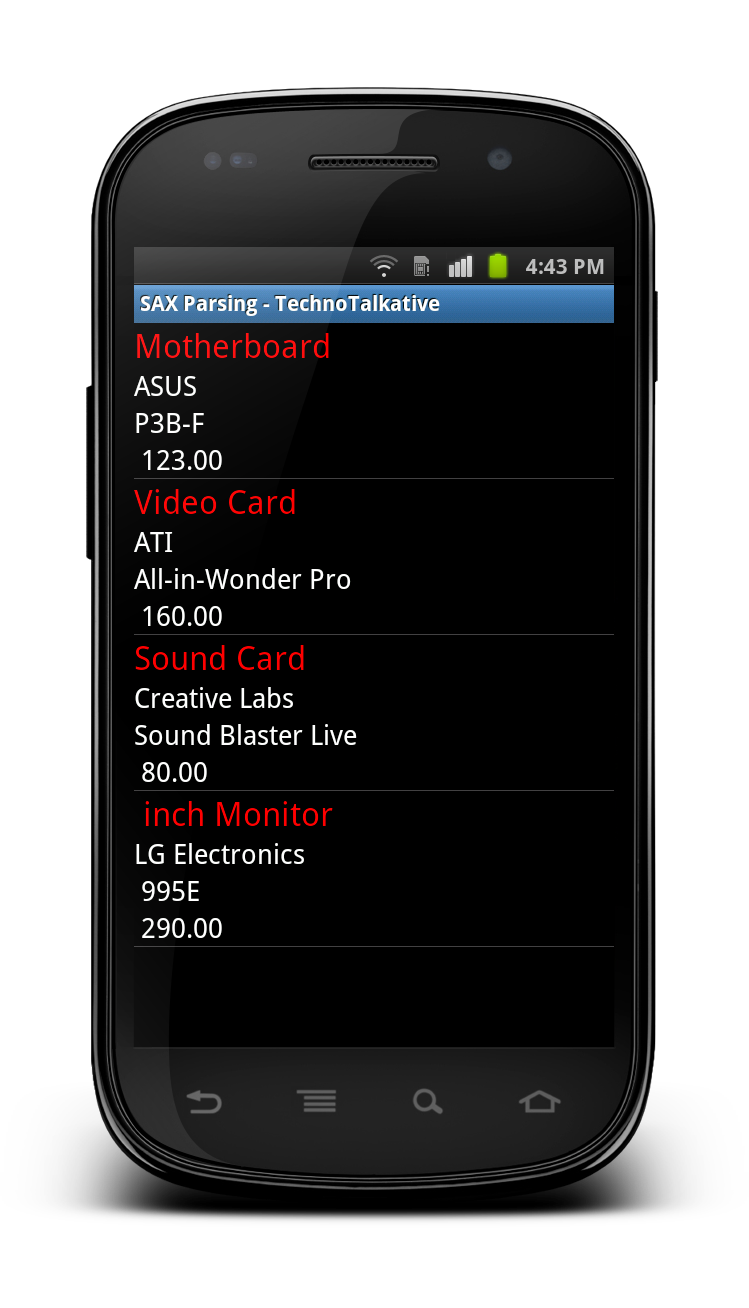
This tutorial is for the Android novice programmer who want to learn how to parse XML using SAX parser. I have also used Custom ListView inside this tutorial to display parsing result into the ListView. If you don’t know how to define a custom adapter for ListView then you should learn it first and come back again to this tutorial.
I have defined prepareXML() function where you can write fixed XML string or you can make a web API call to fetch XML from the server.
Solution:
SAXParsingActivity.java
package com.technotalkative.saxparsing;

import java.io.ByteArrayInputStream;
import java.util.ArrayList;

import javax.xml.parsers.SAXParser;
import javax.xml.parsers.SAXParserFactory;

import org.xml.sax.InputSource;
import org.xml.sax.XMLReader;

import android.app.Activity;
import android.os.Bundle;
import android.widget.ListView;

import com.technotalkative.saxparsing.adapter.myAdapter;

public class SAXParsingActivity extends Activity {
    /** Called when the activity is first created. */

	ItemList itemList;

    @Override
    public void onCreate(Bundle savedInstanceState) {
        super.onCreate(savedInstanceState);
        setContentView(R.layout.main);

        String XML = prepareXML();

       try
       {
    	   SAXParserFactory spf = SAXParserFactory.newInstance();
   		   SAXParser sp = spf.newSAXParser();
   		   XMLReader xr = sp.getXMLReader();

   		   /** Create handler to handle XML Tags ( extends DefaultHandler ) */
   		   MyXMLHandler myXMLHandler = new MyXMLHandler();
   		   xr.setContentHandler(myXMLHandler);

   		   ByteArrayInputStream is = new ByteArrayInputStream(XML.getBytes());
   		   xr.parse(new InputSource(is));
   	  }
      catch(Exception e)
      {

      }

      itemList = MyXMLHandler.itemList;

      ArrayList listItem= itemList.getItem();
      ArrayList listManu = itemList.getManufacturer();
      ArrayList listModel = itemList.getModel();
      ArrayList listCost = itemList.getCost();

      ListView lview = (ListView) findViewById(R.id.listview1);
      myAdapter adapter = new myAdapter(this, listItem, listManu, listModel, listCost);
      lview.setAdapter(adapter);
    }

    private String prepareXML()
    {
    	String strXML = ""
    		+"Computer Parts"
    		+""
    		+"     Motherboard"
    		+"     ASUS"
    		+"      P3B-F"
    		+"      123.00"
    		+"  "
    		+"  "
    		+"     Video Card"
    		+"      ATI"
    		+"     All-in-Wonder Pro"
    		+"       160.00"
    		+"   "
    		+"   "
    		+"     Sound Card"
    		+"     Creative Labs"
    		+"      Sound Blaster Live"
    		+"      80.00"
    		+"  "
    		+"  "
    		+"      inch Monitor"
    		+"     LG Electronics"
    		+"      995E"
    		+"       290.00"
    		+"   "
    		+"";

    	return strXML;
    }
}
MyXMLHandler.java
package com.technotalkative.saxparsing;

import org.xml.sax.Attributes;
import org.xml.sax.SAXException;
import org.xml.sax.helpers.DefaultHandler;

public class MyXMLHandler extends DefaultHandler
{
	public static ItemList itemList;
	public boolean current = false;
	public String currentValue = null;

	@Override
	public void startElement(String uri, String localName, String qName,
			Attributes attributes) throws SAXException {
		// TODO Auto-generated method stub

		current = true;

		if (localName.equals("PARTS"))
		{
			/** Start */
			itemList = new ItemList();

		}
	}

	@Override
	public void endElement(String uri, String localName, String qName)
			throws SAXException {
		// TODO Auto-generated method stub
		current = false;

		if(localName.equals("ITEM"))
		{
			itemList.setItem(currentValue);
		}
		else if(localName.equals("MANUFACTURER"))
		{
			itemList.setManufacturer(currentValue);
		}
		else if(localName.equals("MODEL"))
		{
			itemList.setModel(currentValue);
		}
		else if(localName.equals("COST"))
		{
			itemList.setCost(currentValue);
		}
	}

	@Override
	public void characters(char[] ch, int start, int length)
			throws SAXException {
		// TODO Auto-generated method stub

		if(current)
		{
			currentValue = new String(ch, start, length);
			current=false;
		}
	}
}
itemList.java
package com.technotalkative.saxparsing;

import java.util.ArrayList;

public class ItemList
{
	ArrayList item = new ArrayList();
	ArrayList manufacturer = new ArrayList();
	ArrayList model = new ArrayList();
	ArrayList cost = new ArrayList();

	public ArrayList getItem() {
		return item;
	}
	public void setItem(String item) {
		this.item.add(item);
	}
	public ArrayList getManufacturer() {
		return manufacturer;
	}
	public void setManufacturer(String manufacturer) {
		this.manufacturer.add(manufacturer);
	}
	public ArrayList getModel() {
		return model;
	}
	public void setModel(String model) {
		this.model.add(model);
	}
	public ArrayList getCost() {
		return cost;
	}
	public void setCost(String cost) {
		this.cost.add(cost);
	}
}
main.xml
<?xml version="1.0" encoding="utf-8"?>
<LinearLayout xmlns:android="http://schemas.android.com/apk/res/android"
    android:orientation="vertical"
    android:layout_width="fill_parent"
    android:layout_height="fill_parent"
    >

    <ListView
    	android:id="@+id/listview1"
    	android:layout_width="fill_parent"
    	android:layout_height="fill_parent">
    </ListView>
</LinearLayout>
lview_row.xml
<?xml version="1.0" encoding="utf-8"?>
<LinearLayout xmlns:android="http://schemas.android.com/apk/res/android"
    android:layout_width="match_parent"
    android:layout_height="match_parent"
    android:orientation="vertical" >

    <TextView
        android:id="@+id/txtItem"
        android:layout_width="wrap_content"
        android:layout_height="wrap_content"
        android:text="ITEM"
        android:textAppearance="?android:attr/textAppearanceLarge"
        android:textColor="#FF0000" >
    </TextView>

    <TextView
        android:id="@+id/txtManufacturer"
        android:layout_width="wrap_content"
        android:layout_height="wrap_content"
        android:text="MANUFACTURER"
        android:textAppearance="?android:attr/textAppearanceMedium" >
    </TextView>

    <TextView
        android:id="@+id/txtModel"
        android:layout_width="wrap_content"
        android:layout_height="wrap_content"
        android:text="MODEL"
        android:textAppearance="?android:attr/textAppearanceMedium" >
    </TextView>

    <TextView
        android:id="@+id/txtCost"
        android:layout_width="wrap_content"
        android:layout_height="wrap_content"
        android:text="COST"
        android:textAppearance="?android:attr/textAppearanceMedium" >
    </TextView>

</LinearLayout>
Download Example: https://github.com/PareshMayani/Android-SAX-Parsing