



Android – ToggleButton example
-
Paresh Mayani
- September 12, 2011
- 1 min read
- 1 Comment

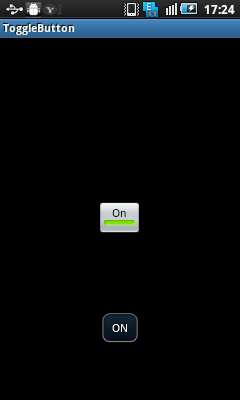
Problem: ToggleBar Example
Description:
This is just the simple example for implementing ToggleButton in android application.
Below are some methods which we have used in this example:
setOnClickListener – Used to register a callback whenever view is clicked
setChecked() – used to mark toggle button as checked/unchecked
setTextOn() – used to display text on toggle button whenever it is CHECKED
setTextOff() – used to display text on toggle button whenever it is UnCHECKED.
Solution:
ToggleButtonActivity.java
package com.paresh.togglebuttonexample;

import android.app.Activity;
import android.os.Bundle;
import android.view.View;
import android.view.View.OnClickListener;
import android.widget.Toast;
import android.widget.ToggleButton;

/**
 *
 * @author Paresh N. Mayani
 * Purpose: Simple Toggle Button example
 */
public class ToggleButtonActivity extends Activity {
    /** Called when the activity is first created. */

	ToggleButton tgbutton;
	private Activity activity;

    @Override
    public void onCreate(Bundle savedInstanceState) {
        super.onCreate(savedInstanceState);
        setContentView(R.layout.main);

        activity = this;

        tgbutton = (ToggleButton) findViewById(R.id.toggleButton1);
        tgbutton.setOnClickListener(new OnClickListener() {

			@Override
			public void onClick(View v) {
				// TODO Auto-generated method stub
				 if (tgbutton.isChecked()) {

			            Toast.makeText(activity, "ON", Toast.LENGTH_SHORT).show();
			        } else {

			            Toast.makeText(activity, "OFF", Toast.LENGTH_SHORT).show();
			        }
			}
		});

        /*
         *  //To set Toggle button checked/unchecked
          tgbutton.setChecked(true); */

        /*
         * To set text on toggle button whenever it is having
            a state either ON or OFF
         */
        //tgbutton.setTextOn("Hi");
       // tgbutton.setTextOff("Hello");

    }
}
main.xml
<?xml version="1.0" encoding="utf-8"?>
<LinearLayout xmlns:android="http://schemas.android.com/apk/res/android"
    android:layout_width="fill_parent"
    android:layout_height="fill_parent"
    android:gravity="center"
    android:orientation="vertical" >

    <ToggleButton
        android:id="@+id/toggleButton1"
        android:layout_width="wrap_content"
        android:layout_height="wrap_content"
        android:text="ToggleButton" >
    </ToggleButton>

</LinearLayout>
Download this example: Android ToggleButton example