
Key Takeaways
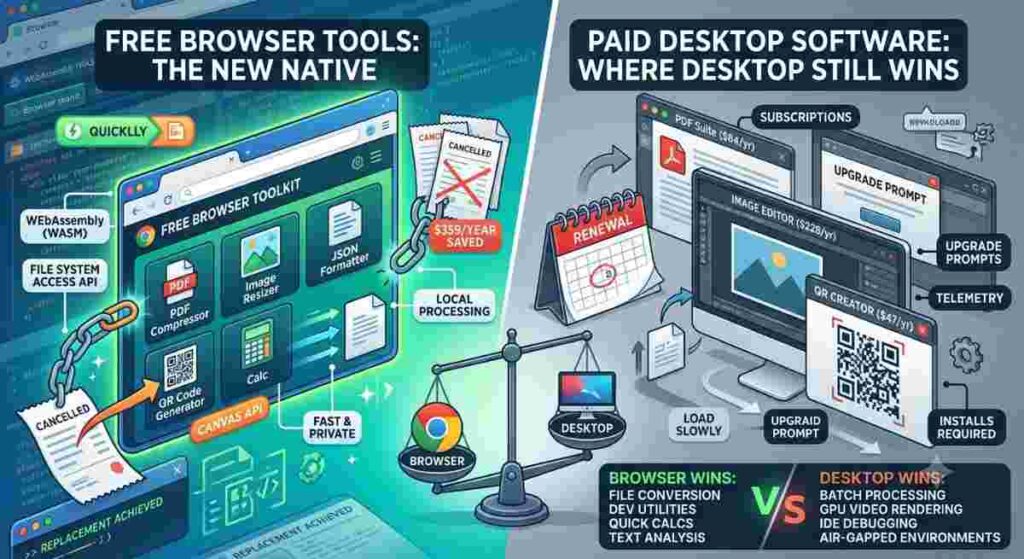
- I cancelled $359/year in desktop software subscriptions after realising my browser could handle the same tasks locally, faster, and with better privacy.
- The browser is no longer a thin client. WebAssembly, the File System Access API, and the Canvas API give JavaScript near-native access to your CPU, filesystem, and graphics pipeline, with no server roundtrip required.
- Browser tools genuinely win for four categories: file conversion, dev utilities, quick calculations, and text analysis. Desktop software still wins for batch processing at scale, GPU video rendering, IDE-integrated debugging, and regulated air-gapped environments.
- The smartest approach is not “browser vs desktop.” It is a deliberate hybrid stack, audited yearly, where each tool earns its place based on actual usage frequency, not marketing.
- Before trusting any “client-side” browser tool, a 30-second DevTools check tells you whether your file actually stays on your machine.
The Receipt That Made Me Rethink My Toolkit
A renewal invoice landed in my inbox in March. Three line items: a PDF compressor ($84/year), an image editing suite ($228/year), and a QR code generator ($47/year). I had used the PDF tool four times in twelve months. The image editor maybe twice a week. The QR generator once for a client demo that got cancelled.
Total annual spend: $359. Actual utility derived: maybe $40 worth, on a generous day.
I did what most engineers do when faced with an uncomfortable subscription audit. I closed the email, told myself I would deal with it later, and forgot about it for two weeks. Then I needed to compress a 47 MB case study before emailing it to a client. The desktop app, the one I had paid $84 to own, prompted me for a $39 upgrade to handle files over 50 MB.
I closed the app. I opened a browser tab. Eleven seconds later, the file was compressed, and I had not uploaded anything anywhere.
That moment is not what changed my workflow. What changed it was the realisation that the browser tab had done the job better than the paid desktop app, faster, with no file size cap, no upgrade prompt, and no telemetry. I started auditing the rest of my toolkit the next weekend.
This is what I learned.
The Architecture Reason: Why Browser Tools Suddenly Got Good
Browser tools are toys. I believed that sentence for most of my career. It was true in 2015. It stopped being true around 2021, and the reason is specific, not vibes-based.
The change came from three technologies that matured at roughly the same time.
WebAssembly (WASM), now a W3C standard, lets browsers execute compiled code at roughly 80–90% of native speed. PDF.js, the library Mozilla wrote and that powers Firefox’s built-in PDF viewer, uses it. When you compress a PDF in a modern browser tool, you are not running JavaScript that interprets a file byte by byte. You are running compiled code that the CPU executes almost natively, inside a sandbox the browser guarantees cannot reach your filesystem without an explicit user grant.
The File System Access API, specified by WHATWG as a living standard, lets a web page read and write local files with the same permission model as a desktop app but only after you click “Allow” in a native dialogue. There is no silent access. Microsoft’s official Edge developer documentation recommends this API specifically for progressive web apps that need to behave like native software.
The Canvas API and OffscreenCanvas give browser code direct access to hardware-accelerated 2D rendering. Image resizing and compression the exact workflow my $228/year image editor was doing runs on the GPU through the same pipeline that Figma uses to render 60fps design files.
I am not making a philosophical argument about “the web winning.” I am making an architectural one: the browser is no longer a thin client. It is a sandboxed runtime with hardware access, file access, and compiled-code execution. The tools built on top of it are no longer toys.
Where Browser Tools Genuinely Win
File conversion and compression
PDF compression measures the gap between desktop and browser better than any benchmark I have tried. The task is compute-bound, single-file, and well-suited to WASM. There is no server roundtrip, no upload bandwidth bottleneck, and no reason to pay a vendor for cloud compute that your laptop can handle locally.
When a client sends me a 40 MB PDF that needs to be under 10 MB for an email attachment, I open an online Word-to-PDF converter in a browser tab. The file is processed in memory, compressed, and handed back usually in under 15 seconds for documents under 100 MB. No install. No trial limit. No “upgrade to handle files over 50 MB.”
For images, the story is the same. I run a small frontend team that processes around 200 web assets per month, resizing hero images, compressing JPEGs, and stripping backgrounds for product photography. We replaced a $19/month-per-designer Adobe plan with a browser-based image compressor. I cannot tell the difference in output quality. Neither can our clients. The cost difference is $228 per designer per year.
Developer utilities
No engineer needs a desktop application to format JSON. I have watched colleagues install VS Code extensions, npm packages, and even Electron apps to prettify 200-line API responses. The browser does this in one line:
JSON.stringify(JSON.parse(input), null, 2);
Tools like ToolifyHub.tools wrap that one-liner in a textarea and save you the install. The same applies to Base64 encoding, URL encoding, hash generation, and code minification. These are stateless single-function operations. Installing desktop software for them is like buying a calculator to do arithmetic your phone already handles.
Quick calculations and text analysis
Financial and health calculators are another category where desktop software is overkill. An equated monthly instalment (EMI) calculation is a single formula:
EMI = P × r × (1 + r)^n / ((1 + r)^n − 1)
No desktop app makes this formula better. Word counters, case converters, and grammar checkers are pure string manipulation. Opening a 2 GB office suite to count 340 words in a paragraph is objectively inefficient. A browser tab opens in under a second.
Where Desktop Software Still Wins
I am not going to pretend the browser replaces everything. It does not. There are four scenarios where desktop software remains the correct answer, and being honest about them is what makes this article trustworthy instead of promotional.
Batch processing at scale
If you compress 4,000 PDFs every night as part of a build pipeline, a browser tool is the wrong instrument. Browser tabs crash when a single process exceeds roughly 2 GB of memory. Desktop tools like ImageMagick or Ghostscript stream-process thousands of files without holding them all in memory at once. For one-off conversions, browser tools win. For batch jobs, native tooling still dominates.
GPU-accelerated video rendering
Browser-based video editors exist. Clipchamp and Canva prove it can be done. But for 4K multi-track editing, real-time colour grading, and effects preview, DaVinci Resolve and Adobe Premiere remain meaningfully faster. The WebGPU API now shipping in Chrome 113+ and Edge 113+ is closing this gap, but for production video work in 2026, desktop still wins.
IDE-integrated debugging
You cannot step through a Go service in a browser tab. You cannot run a local Postgres instance inside WebAssembly for integration testing. You cannot profile a React flame graph without browser DevTools, which, ironically, are themselves a desktop tool embedded in the browser. For deep development work, the IDE remains irreplaceable.
Regulated and air-gapped environments
If you work in HIPAA-regulated healthcare, defence, or finance with strict data residency rules, you may be legally prohibited from using browser tools, even client-side ones, because the browser is itself a third-party runtime. I once consulted for a German bank that blocked all browser-based utilities at the firewall. Their reasoning was conservative but defensible: any browser tool could, in principle, exfiltrate data via a future script injection. For them, desktop software audited line-by-line by their security team was the only acceptable option.
The 30-Second DevTools Audit (How I Verify a Tool Is Actually Client-Side)
Plenty of browser tools claim “client-side processing” and quietly upload your file to a cloud function anyway. Before I trust any new browser utility with a client contract or a CI key, I run this check.
- Open DevTools → Network tab. Run the tool with a dummy test file. If you see a POST request leaving the browser during processing, your file is being uploaded. Close the tab immediately.
- Check the Content-Security-Policy header. A tool that takes client-side processing seriously will set Content-Security-Policy: default-src ‘self’ to block third-party script injection. No CSP, no trust.
- Look for PWA install support. If the tool offers an “Install to home screen” prompt, it is almost certainly running purely client-side. A service worker cannot intercept a server upload without a registered fetch handler, which would be visible in the SW source code.
- Read the privacy policy. If it mentions “servers,” “cloud processing,” or “third-party subprocessors,” the tool is not purely client-side regardless of what its hero copy claims.
The File System Access API specification, published by WHATWG, explicitly enumerates these security considerations for developers building these tools. Any browser utility that follows the spec correctly will process files in memory and never touch disk without an explicit user grant. If a tool asks for broader filesystem permissions than its function requires, treat that as a red flag, not a feature.
The Hybrid Workflow I Actually Run
After a year of testing both sides, my toolkit settled into a simple split:
Desktop (worth paying for)
- VS Code for code
- Chrome DevTools for debugging
- ImageMagick CLI for batch image processing
- DaVinci Resolve for occasional video work
Browser (replaces paid desktop software)
- PDF compression and conversion
- Single-image resizing for web assets
- QR code generation for client deliverables
- JSON formatting and Base64 encoding
- Quick word counts when reviewing copy
The privacy improvement is as real as the cost savings. Desktop tools increasingly phone home with usage analytics. When you process a confidential contract in a desktop PDF compressor, you are trusting that vendor’s privacy policy. When the same compression runs inside your browser’s WASM sandbox with a strict CSP, the file literally cannot leave your machine because the page has no server to send it to. For client work under NDA, that architectural guarantee matters more than any policy document.
The Honest Verdict
Browser tools do not replace all developer software. They replace the specific subset that charges money for tasks a modern browser can do natively, locally, and privately.
The developers who waste the most money on software are not the ones buying too many tools; they are the ones buying tools for jobs the browser already does for free. The next time a desktop app prompts you to upgrade to handle a file slightly larger than the cap, try a browser tab first. Most of the time, the answer is yes, it can do this in under 30 seconds without uploading anything anywhere.
Practical Takeaways
- Audit your subscriptions yearly. If a tool was used fewer than five times last month, find a browser equivalent and cancel the renewal.
- Learn the DevTools Network check. Thirty seconds tells you whether a “client-side” tool is actually client-side.
- Keep desktop software for what it does best. IDEs, debuggers, batch processors, and video editors are worth paying for. Single-function converters usually are not.
- Install browser tools as PWAs if you use them daily. You gain offline support, a dedicated window, and faster cold starts.
- Trust the architecture, not the marketing. A tool running inside a WASM sandbox with a strict CSP is more privacy-safe than a desktop app with an opaque telemetry SDK you cannot inspect.