
Are you still considering security checks as an end-stage task? Then, it is time to rethink your development strategy.
Leaving software security checks for later unnecessarily lengthens your development process, and vulnerabilities may remain after final deployment.
That habit is getting expensive. Verizon’s 2026 Data Breach Investigations Report found that exploiting software flaws is now the most common way attackers break in, behind 31% of breaches.
The practical method to approach this is to follow a secure software development process. Let’s find out what the scope of this process is.
What is Secure Software Development?
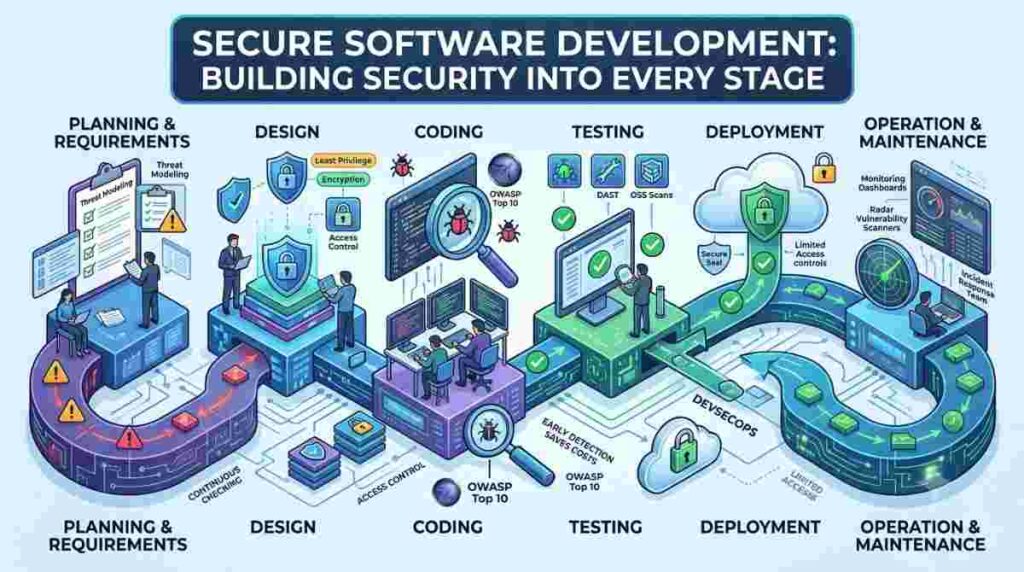
In modern software development, security is considered at every stage of building software, not just at the end. How does it benefit? Instead of one big check before release, teams run many smaller checks along the way, making their jobs easier.
In short, the Secure Software Development Lifecycle (SSDLC) does the following:
- Simultaneously checking security concerns from planning to maintenance
- Finding cyber threats and smaller loopholes and also fixing those
- Making the software more trustworthy with continuous testing
Each stage of development has its own risks, and each one gets its own safeguard. Result? The practice of implementing security measures should feel like a daily task to complete.
The process is also called DevSecOps practice, meaning development, security, and operations are working together.
Why a Last-Minute Security Check Isn’t Enough
You need to review the security measures once before the launch. Sounds efficient, right? However, in practice, it may create more problems.
Problems Found Late Take Longer to Fix
When a developer learns about a flaw the same day they wrote the code, the fix is quick. They still remember how it works. Months later, the same fix means digging through old code and retesting everything around it.
Unfixed Problems Pile Up
Flaws that don’t get fixed turn into what’s called security debt. Veracode’s 2026 report found that 82% of organizations now carry flaws that have stayed open for more than a year. A year earlier, that figure was 74%.
Breaches Cost More Than Prevention
IBM’s 2026 Cost of a Data Breach report puts the average global breach at a record $4.99 million. For US companies, the average is $11.5 million. Catching a flaw during development costs a tiny fraction of that.
Building Security Into Each Stage of Development
Secure software development works best when security starts at the planning stage. Below are the stage-by-stage security integration techniques:
Planning: Assessing Possible Risks
Your software development planning is one of the most crucial phases for implementing security measures. Your team needs to assess possible risks at this stage by asking questions like:
- What sensitive data will this feature handle?
- Who should be able to use it, and who shouldn’t?
- What happens if someone tries to misuse it?
They should also include security measures in planning, such as:
- Compliance with regulations like HIPAA and GDPR
- Following threat-modeling frameworks like STRIDE
- Using automation for software risk assessment and finding out possible threats quickly
Designing and Coding: Catch Mistakes at the Source
Planning’s done. Now what? This is where security moves from a list of ideas into the software’s actual structure, and it’s far cheaper to build it in now than to patch it later.
- Who really needs access? Probably fewer systems than you think. Least privilege gives each one only what it needs.
- Is your data protected? Encryption keeps it unreadable, while authentication and authorization control who gets in.
- Why check everything by hand? SAST, SCA, and secret scanning flag risky code, flawed packages, and exposed keys for you.
- What if one safeguard fails? With defense-in-depth, another layer still stops the attack.
- Think SQL injection is old news? It still shows up in live apps, and so does cross-site scripting. Block both while coding.
- Need a checklist? OWASP’s free Top 10 covers the most common coding mistakes.
Testing: Check Both the Code and the Running App
This is where software security testing does most of its work. The main angles are:
- Checking the code itself for known risky patterns before it’s merged.
- Testing the running application the way an outsider would, looking for weak spots.
- Implementing Dynamic Application Security Testing on running apps.
Teams should also check the open-source libraries they use. Veracode found that 70% of the most serious security debt comes from third-party code, not the team’s own work.
Deployment: Release With Confidence
The team should aim to remove almost every security concern before deployment. What are a few possible deployment strategies to ensure security?
- Release only versions that passed every earlier check.
- Keep live settings secure, such as turning off test accounts and debug features.
- Limit who can push changes to the live environment.
- Have a simple plan to roll back quickly if something goes wrong.
Operation and Maintenance: Keep Watching After Launch
Do the security risks reduce after a thoroughly checked deployment? The answer is both yes and no. Yes, because most anticipated risks are managed by now. But new flaws come to the surface every day.
So, to handle this, you should:
- Monitor live systems for unusual activity, like sudden spikes in failed logins.
- Look for new flaws in the core reliable components of your software.
- Feed what you learn from incidents back into planning the next feature.
Handling Vulnerabilities Without Getting Overwhelmed
As the team completes implementation of security measures and automated checks, they quickly face a new problem: too many alerts. Not every warning is urgent, and treating them all the same leads to burnout.
Good software vulnerability management is about fixing the right things first. A few questions help sort the list:
- Is anyone actively exploiting this flaw? CISA publishes a public list of flaws known to be used in real attacks. Those come first.
- Can an attacker actually reach it? A flaw in a public-facing website matters more than one in an internal tool.
- What would the damage be? Flaws near customer data or payments deserve faster attention.
It also helps to agree on clear fix deadlines based on how serious a problem is. When everyone knows that critical issues get fixed within days, not months, the backlog stops growing quietly in the background.
Finally, every issue needs an owner. A flaw assigned to “the security team” in general often sits untouched. A flaw assigned to the team that wrote the code usually gets fixed.
Secure Software Development Best Practices to Remember
Let’s summarize the secure software development best practices:
- Talk about security risks when planning every significant feature.
- Catch common mistakes early with tools on developers’ machines.
- Run automatic security checks every time code changes.
- Check open source libraries, not just your own code.
- Protect your build pipeline as carefully as your live systems.
- Fix the most dangerous issues first, with clear deadlines.
- Give every security issue a clear owner.
- Start small and expand as the team builds confidence.
Final Thoughts
Secure software development is one of the most important practices that every development team must follow. Why is it so important? Because it is a steady habit that can make security measure implementation, testing, and monitoring much easier and compliant with modern guidelines.
A practical approach is to start small and fix one stage of development at a time. Also, focusing on new problems that keep showing up is another helpful strategy to manage risks effectively.