
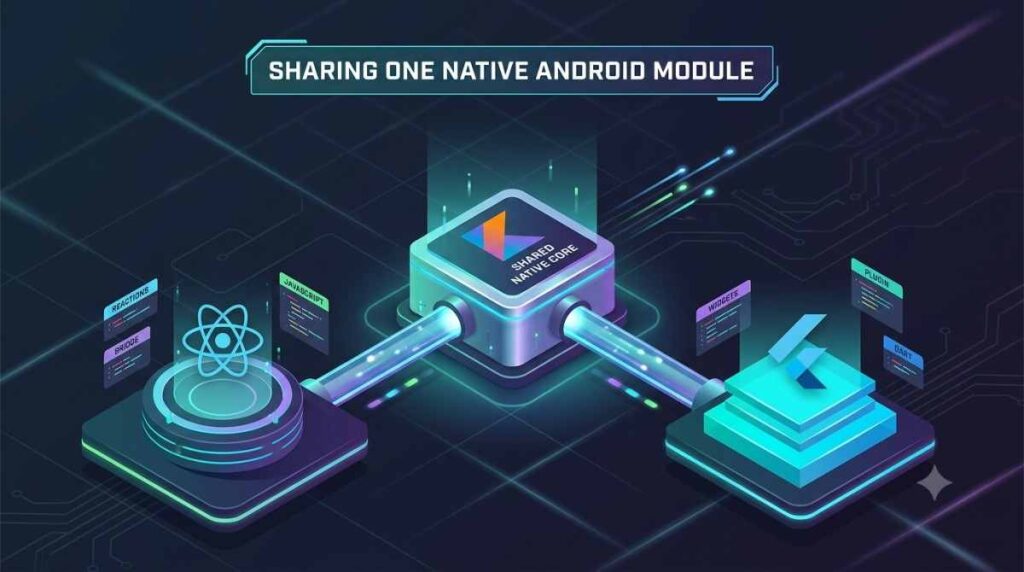

If your company runs a Flutter app and a React Native app against the same hardware or the same security requirement, you do not need two Kotlin implementations. You need one Android library and two deliberately thin bridges. Here is the structure that survives contact with production, the four things that break, and the cases where sharing is the wrong call.
Cross-platform framework choice is usually discussed as if a company picks one and lives with it. In practice plenty of organisations end up running both. An acquisition brings a Flutter app into a React Native shop. A second product team picks a different framework. A rewrite stalls halfway and the old app stays in the store for two more years. Whatever the history, the moment both apps need the same native Android capability, somebody has to decide how that capability gets written.
The instinct is to write the Kotlin once, then copy the file into the second plugin project. It works for one release. By the third it has diverged, because a bug was fixed on one side and not the other, and nobody can tell which copy is correct. This article covers the alternative, which is not complicated but does require being strict about one boundary.
The shape: one library, two thin bridges
Three artifacts, not two:
| scanner-core/ Android library. Pure Kotlin. No Flutter, no React Native. flutter_scanner/ Flutter plugin. Depends on scanner-core. react-native-scanner/ React Native module. Depends on scanner-core. |
The core is an ordinary Android library published as an AAR. It contains every line of logic worth getting right: the device SDK calls, the protocol handling, the retry policy, the parsing. The two bridges contain no logic at all. They translate types, hop threads, and map errors.
The rule that makes this work is blunt. The core must never import io.flutter.* or com.facebook.react.*. If you can build the core in a project with neither framework on the classpath, the boundary is intact. This is worth enforcing in CI rather than in a code review convention, because the pressure to reach across is constant and always has a good excuse behind it.
What belongs in the core
Plain Kotlin types and suspending functions. No framework callbacks, no framework threading assumptions, and an applicationContext rather than an Activity.
| // scanner-core/src/main/kotlin/com/example/scanner/DocumentScanner.kt package com.example.scanner data class ScanResult( val documentId: String, // a String on purpose, see the marshalling section val pageCount: Int, val capturedAtIso: String // ISO 8601, not a platform timestamp type ) sealed interface ScanError { val code: String data object PermissionDenied : ScanError { override val code = “permission_denied” } data object HardwareUnavailable : ScanError { override val code = “hardware_unavailable” } data class Decode(val reason: String) : ScanError { override val code = “decode_failed” } } sealed interface ScanOutcome { data class Success(val result: ScanResult) : ScanOutcome data class Failure(val error: ScanError) : ScanOutcome } interface DocumentScanner { suspend fun scan(deviceId: String): ScanOutcome fun observeStatus(): Flow<ScannerStatus> } |
Returning a sealed outcome rather than throwing is the detail that pays off later. Both bridges need to turn a failure into their own framework’s error representation, and an exception type that crosses the boundary forces each bridge to guess at what it caught.
What belongs in each bridge
Four jobs, and nothing else: convert arguments and return values into what the framework’s codec can carry, move work onto the right thread, translate the sealed error into the framework’s error shape, and hold whatever framework lifecycle object is needed to reach an Activity.
The Flutter bridge
| class ScannerPlugin : FlutterPlugin, MethodChannel.MethodCallHandler { private lateinit var channel: MethodChannel private lateinit var scanner: DocumentScanner // Main dispatcher, because MethodChannel.Result must be answered on the platform thread. private val scope = CoroutineScope(SupervisorJob() + Dispatchers.Main) override fun onMethodCall(call: MethodCall, result: MethodChannel.Result) { when (call.method) { “scan” -> { val deviceId = call.argument<String>(“deviceId”) if (deviceId == null) { result.error(“bad_args”, “deviceId is required”, null); return } scope.launch { when (val outcome = scanner.scan(deviceId)) { is ScanOutcome.Success -> result.success(outcome.result.toMap()) is ScanOutcome.Failure -> result.error( outcome.error.code, outcome.error.toMessage(), null ) } } } else -> result.notImplemented() } } } |
On a new plugin, prefer Pigeon over hand written MethodChannel string keys. It generates the Dart and Kotlin interfaces from one schema file, which removes the class of bug where a channel argument is renamed on one side only. The structure above does not change; Pigeon simply replaces the when (call.method) block with a generated interface you implement.
The React Native bridge
| class ScannerModule(ctx: ReactApplicationContext) : ReactContextBaseJavaModule(ctx) { private val scanner = ScannerFactory.create(ctx.applicationContext) private val scope = CoroutineScope(SupervisorJob() + Dispatchers.Default) override fun getName() = “Scanner” @ReactMethod fun scan(deviceId: String, promise: Promise) { scope.launch { when (val outcome = scanner.scan(deviceId)) { is ScanOutcome.Success -> promise.resolve(outcome.result.toWritableMap()) is ScanOutcome.Failure -> promise.reject(outcome.error.code, outcome.error.toMessage()) } } } } |
Under the New Architecture this becomes a TurboModule with a codegen’d spec, which is worth doing for the type safety across the JS boundary. The important part is unchanged: the module resolves a promise and owns no logic.
Both app teams then write their own idiomatic facade, and neither app’s product code knows the shared library exists.
| // Flutter final result = await DocumentScanner.scan(deviceId: deviceId);// React Native const result = await Scanner.scan(deviceId); |
Four things that break, roughly in the order they will bite you
1. Threading
The two frameworks hand you work on different threads and want answers on different threads. Flutter invokes your method call handler on the platform thread and expects Result to be answered there. React Native has historically run native module methods off the JS thread, and the New Architecture changes the picture again.
Do not let the core care. Give it its own dispatcher, make every public function either suspend or explicitly asynchronous, and make each bridge responsible for arriving back where its framework requires. That is why the Flutter plugin above builds its scope on Dispatchers.Main and the React Native module does not.
2. The 64-bit integer that arrives wrong
This one costs an afternoon the first time. Flutter’s standard codec carries 64-bit integers correctly. JavaScript numbers are IEEE 754 doubles, so any integer beyond 2^53 loses precision on the way into a React Native app, silently and without an error.
If your core returns database identifiers, timestamps in milliseconds since epoch, or anything else that can exceed that range, pass them as String and parse at the edge. That is why documentId is a String in the core above, and why the timestamp is an ISO 8601 string rather than a number. Making the core’s contract safe for the weaker of the two codecs is cheaper than remembering which fields are dangerous.
3. Errors that lose their meaning
Each framework has its own error channel, and left alone each bridge will invent its own codes. Map the sealed type once, in one table, and keep the codes identical across both so that support tickets from either app are searchable in the same place.
| Core | Flutter | React Native |
| PermissionDenied | result.error(“permission_denied”, …) | promise.reject(“permission_denied”, …) |
| HardwareUnavailable | result.error(“hardware_unavailable”, …) | promise.reject(“hardware_unavailable”, …) |
| Decode(reason) | result.error(“decode_failed”, reason, …) | promise.reject(“decode_failed”, reason) |
4. Gradle version skew
The shared library is consumed by two app builds that will not upgrade in step. Three practical consequences.
Set the core’s minSdk to the lower of the two apps, not to whatever the newer app uses. Keep the core’s dependency list short and prefer compileOnly or a narrow API surface, because every transitive dependency is a chance to collide with something in either app. And publish a real artifact rather than including the source in both projects.
| // scanner-core/build.gradle.kts android { namespace = “com.example.scanner” compileSdk = 35 defaultConfig { minSdk = 23 } // the lower of the two consuming apps } |
Publish to a private Maven repository, version it semantically, and let each bridge pin a version. A Git submodule shared into two app builds gives you one source of truth and two different compiled outputs, which is the worst of both arrangements.
Streaming events to both frameworks
Anything continuous, such as connection state or scan progress, should be a Flow on the core and nothing else. The Flutter bridge adapts it to an EventChannel, the React Native bridge emits to its event emitter, and each bridge cancels its subscription when its framework tears the module down. Leaked subscriptions are the most common way a shared library starts draining battery in only one of the two apps, and it is always the bridge that is at fault rather than the core.
When sharing is the wrong call
A native module is a permanent maintenance obligation, and a shared one is an obligation against two frameworks’ upgrade cycles instead of one. We apply the same test here that decides when writing your own native module is the right call: the capability has to be either unavoidable for a core flow or genuinely expensive to get right, and it ships with a written exit plan rather than becoming the thing that blocks the next upgrade.
Three cases where the answer is no. If a well maintained plugin already exists for both frameworks, use both plugins and accept the small duplication, because you are buying somebody else’s upgrade work. If the logic is a thin wrapper over an AndroidX API, the wrapper is cheaper to write twice than to version and publish. And if the thing you want to share is UI, stop: each framework owns its own rendering, and a shared Android View embedded in both is a support burden out of proportion to the code it saves.
There is also an honest limit to economics. This pattern shares Android. You still have two iOS implementations unless you repeat the exercise with a Swift framework, and the saving only justifies the extra artifact when the native logic is substantial.
A checklist before you start
- Can the core compile with neither framework on the classpath? If not, the boundary is already gone.
- Does every value crossing the bridge survive the weaker codec, with large integers as strings?
- Is minSdk the lower of the two apps?
- Is there one error code table, used identically by both bridges?
- Is the library published as a versioned artifact rather than source-included twice?
- Does each bridge cancel its subscriptions on teardown?
That list is small enough to run in an afternoon and catches most of what goes wrong. The same discipline that keeps a native surface small in the first place is what makes it shareable later, which is visible in a cross-platform build we shipped with a deliberately small set of native modules.
What to do first
Take the capability both apps need and try to describe it in Kotlin without naming either framework. If you can write that interface in one sitting, the shared library is the right move and the two bridges will take less time than the argument about who owns the code. If you cannot, whatever you are trying to share is not a native capability. It is application logic that belongs in each app, and pushing it into Android will cost more than the duplication it removes.