
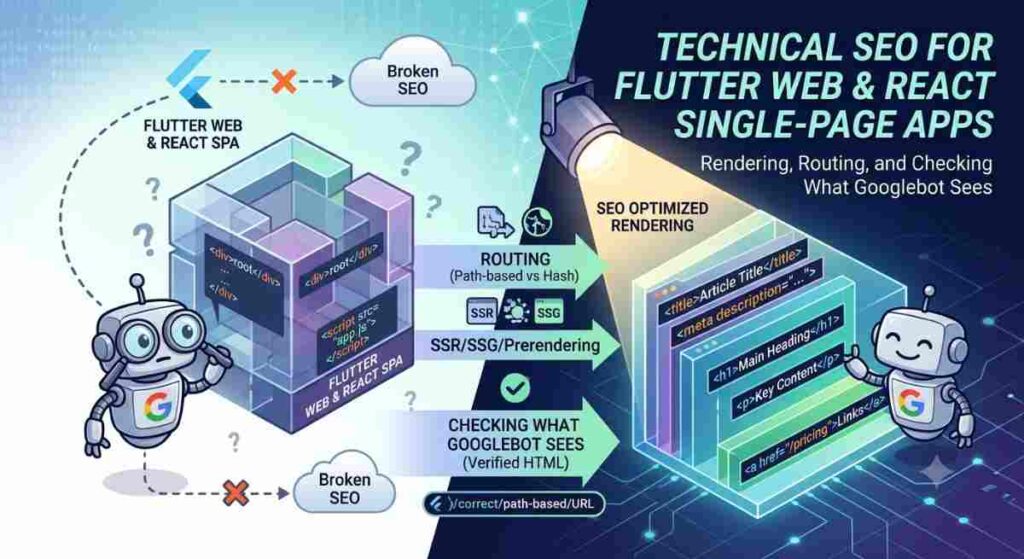

Single-page apps (SPAs) built with Flutter Web or React are common for product demos, marketing sites attached to SaaS products, and internal tools that later become public. They can rank, but only if search engines can see real HTML content, stable URLs, and crawlable links. This guide covers the rendering choices that matter, how routing affects indexing, and a practical checklist for verifying what Googlebot actually receives.
Why SPAs Still Break SEO
Classic multi-page sites return full HTML for every URL. Many SPAs return a thin shell and fill the page in the browser with JavaScript. If Googlebot cannot execute that JavaScript in time, or if important content only appears after client-side API calls, the indexed page can look empty.
- The initial HTML has almost no text, only a root `<div>` and script tags.
- Routes are client-only (`#/page` or history routes with no server fallback), so deep links return 404 from the server.
- Titles and meta descriptions never change after navigation, so every URL looks identical in search results.
- Important links are created only after hydration, or use `onClick` handlers without real `href` attributes.
- Soft 404s: the app shows a “not found” screen in the UI while the server still returns HTTP 200.
Flutter Web and React hit the same problems in different ways. Flutter Web compiles to CanvasKit or HTML renderers; the HTML renderer is usually easier for crawlers to interpret as text. React SPAs often ship with Create React App, Vite, or Next.js — and the SEO outcome depends far more on server rendering than on the UI library itself.
Rendering Options That Actually Matter
1. Client-side rendering (CSR) only
The server sends a shell. The browser downloads JS, boots the app, then fetches data. Google can render many CSR pages, but it is slower, less reliable for large JS bundles, and weak for social previews and non-Google crawlers.
Use CSR-only only for authenticated app areas that should not rank.
2. Server-side rendering (SSR) / dynamic rendering for bots
The server (or an edge function) returns HTML that already contains the main content for the requested URL. React teams often use Next.js, Remix, or a custom Express/Node renderer. For Flutter Web, SSR is less mature; teams often serve a statically pre-rendered marketing shell or keep the public site on a separate HTML/WordPress stack.
3. Static site generation (SSG) / prerendering
At build time you generate HTML for known routes. This works well for marketing pages, docs, and blog posts. Tools like Next.js `getStaticProps`, Vite SSG plugins, or prerender services (Prerender.io, Rendertron-style pipelines) produce crawlable HTML without running a Node process on every request.
4. Hybrid: SSR/SSG for public pages, CSR for the app
The pattern that usually wins: keep `/`, `/pricing`, `/blog`, `/docs` as prerendered or SSR HTML, and load the heavy SPA only behind `/app` after login. Users still get a modern product UI; search engines get real documents.
Routing: Make Every Public URL a Real Document
1. Avoid hash routing for public content
URLs like `https://example.com/#/features` are one document to crawlers. Prefer path-based routes: `/features`, `/pricing`, `/blog/post-slug`.
2. Configure the server for history API fallback carefully
SPA fallbacks that send `index.html` for every unknown path can create soft 404s. Better approach:
- Known public routes: return prerendered/SSR HTML with status 200.
- Unknown routes: return a real HTTP 404 (or 410) with a simple HTML not-found page.
- App routes behind auth: noindex, or block with robots if they should never appear in search.
3. Canonical URLs and trailing slashes
Pick one host (`www` vs apex), one protocol (`https`), and one trailing-slash policy. Emit a matching `<link rel=”canonical”>` in the HTML the crawler sees, not only after client hydration.
Titles, Meta, and Structured Data Must Exist in First HTML
For each public route, the first HTML response should include:
- A unique `<title>`
- A unique meta description
- Open Graph tags if you care about social sharing
- Relevant structured data (SoftwareApplication, FAQPage, Article, Organization) as JSON-LD in the initial HTML
In React, that usually means SSR/SSG head management (Next.js `Metadata` API, Remix meta exports, or react-helmet-async only if SSR is enabled). Updating `document.title` only in `useEffect` is too late for reliable indexing.
Flutter Web marketing pages often need a separate HTML template per route or a non-Flutter public site. Do not rely on CanvasKit-drawn text as your primary SEO content.
Internal Links Googlebot Can Follow
Crawlers discover URLs through links. Requirements:
- Use real `<a href=”/path”>` elements for public navigation.
- Do not hide primary navigation behind click handlers with no `href`.
- Keep an HTML sitemap page or XML sitemap for large route sets.
- Limit infinite calendar/filter URLs; canonicalize or noindex thin parameter pages.
If your SPA builds the nav only after an API call, prerender the main nav links into the initial HTML.
How to Check What Googlebot Actually Sees
Do not guess. Verify.
1. View the raw response (no JS)
curl -sL -A “Mozilla/5.0 (compatible; Googlebot/2.1; +http://www.google.com/bot.html)” \ “https://yoursite.com/pricing” | head -n 80
Look for real headings and body copy in that output. If you only see an empty root node and script tags, Google may struggle.
2. Disable JavaScript in a browser
Open the URL with JS disabled. Can you still read the main offer, pricing, and nav links? If not, crawlers that do not fully render will not either.
3. Google Search Console URL Inspection
Use “View crawled page” / screenshot and HTML from URL Inspection. Compare:
- Does the crawled HTML include your H1 and key paragraphs?
- Is the title correct?
- Are there soft 404 signals?
4. Mobile-friendly and rich-result tests
Run the live URL through Google’s rich results test and confirm JSON-LD is present in the fetched HTML, not only after client render.
5. Log-file or CDN logs (when available)
Confirm Googlebot receives 200 for important URLs and 404 for junk paths. Watch for accidental 200s on deleted routes.
A Practical Implementation Checklist
**Architecture**
· [ ] Public marketing/docs pages are SSR, SSG, or prerendered
· [ ] Authenticated app routes are separate and noindexed if needed
· [ ] Hash routing is not used for public content
**Server**
· [ ] Each public URL returns unique HTML with status 200
· [ ] Unknown URLs return real 404 HTML
· [ ] HTTPS and host canonicalization work without redirect chains
**On-page**
· [ ] Unique title and meta description per route in first HTML
· [ ] H1 matches the page intent
· [ ] Main content is in the HTML text, not only in images/canvas
· [ ] Internal links use real `href`s
**Verification**
· [ ] `curl` as Googlebot shows content
· [ ] GSC URL Inspection matches expectations
· [ ] XML sitemap lists only indexable public URLs
· [ ] robots.txt does not block CSS/JS needed for rendering (if you still rely on client render for some pages)
Flutter Web Notes
Flutter Web is excellent for interactive UIs, but CanvasKit text is a poor SEO foundation. Practical patterns that work:
- Keep the corporate site, blog, and landing pages on HTML/SSR (for example WordPress or a static site), and embed or link to the Flutter app for the product experience.
- If you must ship Flutter Web publicly, prefer the HTML renderer for content-heavy pages, add meaningful static HTML in `web/index.html` for the primary landing route, and prerender critical routes where possible.
- Always put crawlable copy in HTML for the pages you want ranked; do not assume painted canvas text will be indexed as meaningful content.
React Notes
Prefer a framework with first-class SSR/SSG (Next.js, Remix, Astro with React islands) for any page that should rank. If you are stuck on a pure CSR Vite/CRA app:
- Prerender known routes at build time, or
- Put a reverse-proxy prerenderer in front of bots, or
- Migrate public pages to a hybrid setup first (highest ROI pages: home, pricing, integrations, blog)
A free on-page check such as https://theoceanmarketing.com/free-seo-audit/ is useful after deploy to catch missing titles, thin content, and basic technical issues before you wait on crawl data.
Common Mistakes to Avoid
- Treating “Google can run JavaScript as “CSR is fine.” It can work; it is not the durable default for marketing pages.
- Returning 200 for app 404 screens. Soft 404s waste crawl budget and confuse indexing.
- Duplicate titles across client routes. Every public URL needs its own head tags in the first HTML.
- Blocking JS/CSS in robots.txt while still depending on client render.
- Putting the only conversion copy inside a WebGL/Canvas layer with no HTML alternative.
Closing
Technical SEO for Flutter Web and React SPAs is mostly an architecture decision: give search engines real HTML documents for public URLs, keep routing honest with correct status codes, and verify with curl, JS-disabled browsing, and Search Console — not with assumptions. Ship the product UI clients love, but do not make Googlebot reverse-engineer it to learn what the page is about.